
Tutorial 5.1: Using external packages to generate a Finite Element mesh#
In this tutorial you will learn how to generate a mesh using the Gmsh package.
In this tutorial we will see a simple example on how to use this software through the python interface. For more details on how to use this software, including the graphic interface, please go to the documentation page
You can install the package calling the command: pip install --upgrade gmsh
1. Generate the mesh#
1.1. Initialize the model#
We first import the gmsh package and initialize the geometry model.
import gmsh
gmsh.initialize()
gmsh.model.add("plate")
---------------------------------------------------------------------------
ModuleNotFoundError                       Traceback (most recent call last)
Cell In[1], line 1
----> 1 import gmsh
      2 gmsh.initialize()
      3 gmsh.model.add("plate")

ModuleNotFoundError: No module named 'gmsh'
1.2. Create the geometry#
H = 10.0
B = 5.0
t= 0.5
# Outer rectangle (last entry is the tag)
gmsh.model.occ.addRectangle(0.0,0.0,0.0,B,H,2)
# Inner rectangle (last entry is the tag)
gmsh.model.occ.addRectangle(t,t,0.0,B-2*t,H-2*t,3)
# Subtract inner from outer (notation: (dimension,tag))
structure = gmsh.model.occ.cut([(2,2)], [(2,3)], 4, True, True)
1.3. Assign entities#
The Gmsh model contains several geometrical entities of different dimension:
Nodes: dimension 0
Lines: dimension 1
Surfaces: dimension 2
We can see the entities of our model calling the function getEntities(). If we send -1 as argument, it will return all the entities in a tuple with dimension and entity tag (dim,tag).
print(gmsh.model.occ.getEntities(-1))
[(0, 1), (0, 2), (0, 3), (0, 4), (0, 5), (0, 6), (0, 7), (0, 8), (1, 1), (1, 2), (1, 3), (1, 4), (1, 5), (1, 6), (1, 7), (1, 8), (2, 4)]
The problem that we have now is that if we do not know which entity belongs to each part of the geometry. We can either use the Gmsh graphic interface to identify entities, or select them based on their position through the getEntitiesInBoundingBox() function.
inner_boundary_line = gmsh.model.occ.getEntitiesInBoundingBox(t/2,t/2,-0.1,B-t/2,H-t/2,0.1,1)
inner_boundary_point = gmsh.model.occ.getEntitiesInBoundingBox(t/2,t/2,-0.1,B-t/2,H-t/2,0.1,0)
right_boundary_line = gmsh.model.occ.getEntitiesInBoundingBox(B-t/2,-0.1,-0.1,B+t/2,H+t/2,0.1,1)
right_boundary_point = gmsh.model.occ.getEntitiesInBoundingBox(B-t/2,-0.1,-0.1,B+t/2,H+t/2,0.1,0)
left_boundary_line = gmsh.model.occ.getEntitiesInBoundingBox(-t/2,-0.1,-0.1,t/2,H+t/2,0.1,1)
left_boundary_point = gmsh.model.occ.getEntitiesInBoundingBox(-t/2,-0.1,-0.1,t/2,H+t/2,0.1,0)
top_boundary_line = gmsh.model.occ.getEntitiesInBoundingBox(-t/2,H-t/2,-0.1,B+t/2,H+t/2,0.1,1)
bottom_boundary_line = gmsh.model.occ.getEntitiesInBoundingBox(-t/2,-t/2,-0.1,B+t/2,t/2,0.1,1)

# Get the tags only
inner_boundary_line_tags = [dim_tags[1] for dim_tags in inner_boundary_line]
inner_boundary_point_tags = [dim_tags[1] for dim_tags in inner_boundary_point]
right_boundary_line_tags = [dim_tags[1] for dim_tags in right_boundary_line]
right_boundary_point_tags = [dim_tags[1] for dim_tags in right_boundary_point]
left_boundary_line_tags = [dim_tags[1] for dim_tags in left_boundary_line]
left_boundary_point_tags = [dim_tags[1] for dim_tags in left_boundary_point]
top_boundary_line_tags = [dim_tags[1] for dim_tags in top_boundary_line]
bottom_boundary_line_tags = [dim_tags[1] for dim_tags in bottom_boundary_line]
Once we have the entity tags identified, we can assign them to physical groups, with the corresponding tag, so later they are propagated to the mesh properties.
gmsh.model.addPhysicalGroup(0,inner_boundary_point_tags,1,"inner")
gmsh.model.addPhysicalGroup(1,inner_boundary_line_tags,1,"inner")
gmsh.model.addPhysicalGroup(0,right_boundary_point_tags,2,"right")
gmsh.model.addPhysicalGroup(1,right_boundary_line_tags,2,"right")
gmsh.model.addPhysicalGroup(0,left_boundary_point_tags,3,"left")
gmsh.model.addPhysicalGroup(1,left_boundary_line_tags,3,"left")
gmsh.model.addPhysicalGroup(1,top_boundary_line_tags,4,"top")
gmsh.model.addPhysicalGroup(1,bottom_boundary_line_tags,5,"bottom")
gmsh.model.addPhysicalGroup(2,[4],5,"interior")
5
We just need to generate the mesh. Before doing this we syncronize the geometry model.
# Synchronize
gmsh.model.occ.synchronize()
gmsh.model.geo.synchronize()
1.4. Create the mesh and write to file#
Finally we can generate the mesh with the generate() function.
gmsh.model.mesh.generate()
Let’s store the mesh and finalize the model.
gmsh.write("mesh.msh")
# gmsh.finalize() # Uncomment this line to finalize the model if we just want to create the mesh. Here we will continue to get the data.
2. Read the mesh#
Once we have generated the mesh, we need to get the quantities that we need for our Finite Element solver. That is, the list of nodal coordinates and the list of elemental connectivities. In addition, we want also to identify nodes in different boundaries to apply different boundary conditions.
From a mesh in Gmsh format (“.msh”), we can also use the gmsh package to obtain the information through the gmsh.open() function. In that case, since we already have the model, we will not have to do this step.
We can get the list of nodes with the getNodes() function. Sending -1 as argument will ensure we get the nodes from entities in all dimensions.
nodes = gmsh.model.mesh.getNodes(-1)
Since we are in 2D and the geometry is 3D, we remove the \(z\) coordinate.
import numpy as np
coords3D = nodes[1]
NoN = len(nodes[0])
NL = np.zeros([NoN,2])
for i in range(0,NoN):
    NL[i] = [coords3D[i*3], coords3D[i*3+1]]
The next step is to get the elements with the local to global node ids. Here we will only get the elements of dimension \(2\). We will not use elements of lower dimension in this tutorial.
elements = gmsh.model.mesh.getElements(2)
The first entry is the list of element types. In that case we only have one type: \(2\), which is the 3-node triangle.
if elements[0][0] == 2:
    element_type = 'D2TR3N'
    NPE = 3
print("Element type: ",element_type)
Element type: D2TR3N
The second entry is the element tags, not relevant for this specific tutorial, but it could be useful when dealing with problems with multiple materials, for example.
element_tags = elements[1][0]
NoE = len(element_tags)
print("Number of Elements: ",NoE)
Number of Elements: 54
Finally the third entry is the elemental node tags. Here we reshape it to be an array of two dimensions instead of a list.
EL = np.reshape(elements[2][0],[NoE,NPE])
3. Solve the linear elastic problem using Finite Element method#
3.1 Discretize the geometry#
Now that we have the discretized geometry, we can proceed as in the previous tutorial.
import math
import matplotlib.pyplot as plt
We can plot the mesh with the corresponding node and element identifiers:
NoN = np.size(NL, 0)
NoE = np.size(EL, 0)

plt.figure(1)

count = 1
for i in range(0, NoN):
    plt.annotate(count, xy = (NL[i,0],NL[i,1]))
    count += 1

if element_type == 'D2QU4N':
    count2 = 1
    for j in range(0, NoE):
        plt.annotate(count2, xy = ((NL[EL[j,0]-1,0]+NL[EL[j,1]-1,0]+NL[EL[j,2]-1,0]+NL[EL[j,3]-1,0])/4,
                                   (NL[EL[j,0]-1,1]+NL[EL[j,1]-1,1]+NL[EL[j,2]-1,1]+NL[EL[j,3]-1,1])/4),
                                  c = 'blue')
        count2 += 1

    # Plot lines
    x0, y0 = NL[EL[:,0]-1,0], NL[EL[:,0]-1,1]
    x1, y1 = NL[EL[:,1]-1,0], NL[EL[:,1]-1,1]
    x2, y2 = NL[EL[:,2]-1,0], NL[EL[:,2]-1,1]
    x3, y3 = NL[EL[:,3]-1,0], NL[EL[:,3]-1,1]
    plt.plot(np.array([x0,x1]), np.array([y0,y1]), 'red', lw=3)
    plt.plot(np.array([x1,x2]), np.array([y1,y2]), 'red', lw=3)
    plt.plot(np.array([x2,x3]), np.array([y2,y3]), 'red', lw=3)
    plt.plot(np.array([x3,x0]), np.array([y3,y0]), 'red', lw=3)


if element_type == 'D2TR3N':

    count2 = 1
    for j in range(0, NoE):
        plt.annotate(count2, xy = ((NL[int(EL[j,0]-1),0]+NL[int(EL[j,1]-1),0]+NL[int(EL[j,2]-1),0])/3,
                                   (NL[int(EL[j,0]-1),1]+NL[int(EL[j,1]-1),1]+NL[int(EL[j,2]-1),1])/3),
                                  c = 'blue')
        count2 += 1

    # Plot lines
    x0, y0 = NL[EL[:,0]-1,0], NL[EL[:,0]-1,1]
    x1, y1 = NL[EL[:,1]-1,0], NL[EL[:,1]-1,1]
    x2, y2 = NL[EL[:,2]-1,0], NL[EL[:,2]-1,1]
    plt.plot(np.array([x0,x1]), np.array([y0,y1]), 'red', lw=3)
    plt.plot(np.array([x1,x2]), np.array([y1,y2]), 'red', lw=3)
    plt.plot(np.array([x2,x0]), np.array([y2,y0]), 'red', lw=3)
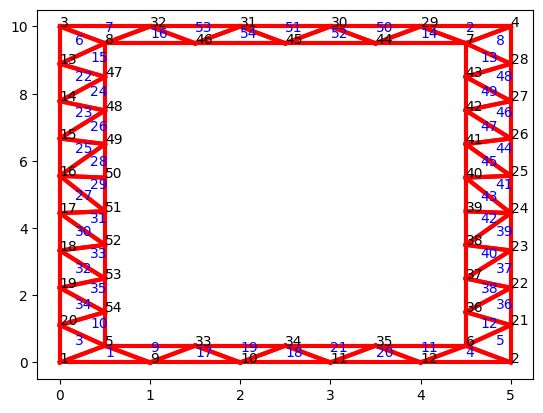
3.2. Define the shape functions#
The second step in our Finite Element recipie consists on defining the shape functions and their derivatives. Here we will make use of the isoparametric map and numerical integration to re-use as much information as possible.
Before defining the shape functions we first define the quadrature rule that will be used to integrate. Here we need to specify the location of the quadrature points and the corresponding weights. In this example we consider a \(1\)-point quadrature rule for the triangular elements. For the quadrilateral elements we define a \(1\)-point and \(4\)-point (\(2\times2\)) quadrature rule. See below an explanation about the reason why we need more quadrature points for quadrilaterals.
The function GaussPoint returns the coordinates \((\xi, \eta)\) of the quadrature point gp in the reference element, together with the corresponding weight \(\alpha_{gp}\).
def GaussPoint(NPE, GPE, gp): # Gaussian point theory needed
    if NPE == 3:
        if GPE == 1:
            if gp == 1:
                xi, eta, alpha = 1/3, 1/3, 1
    if NPE == 4:
        if GPE == 1:
            if gp == 1:
                xi, eta, alpha = 0, 0, 4
        if GPE == 4:
            if gp == 1:
                xi, eta, alpha = -1/math.sqrt(3), -1/math.sqrt(3), 1
            if gp == 2:
                xi, eta, alpha = 1/math.sqrt(3), -1/math.sqrt(3), 1
            if gp == 3:
                xi, eta, alpha = 1/math.sqrt(3), 1/math.sqrt(3), 1
            if gp == 4:
                xi, eta, alpha = -1/math.sqrt(3), 1/math.sqrt(3), 1

    return (xi, eta, alpha)
Using linear polynomials, we will have the following shape functions for triangular elements:
and the following shape functions for quadrilaterals:
The function grad_N_nat returns the gradient of the shape functions evaluated at given point \((ξ,η)\). Using index notation, the returned value is:
Note that for the linear elastic problem we do not need to define shape functions if the external distributed load is zero.
def grad_N_nat(NPE, xi, eta):

    PD = 2
    result = np.zeros([PD, NPE])

    if NPE == 3:
        result[0,0] = 1
        result[0,1] = 0
        result[0,2] = -1
        result[1,0] = 0
        result[1,1] = 1
        result[1,2] = -1
    if NPE == 4:
        result[0,0] = -1/4*(1-eta)
        result[0,1] = 1/4*(1-eta)
        result[0,2] = 1/4*(1+eta)
        result[0,3] = -1/4*(1+eta)
        result[1,0] = -1/4*(1-xi)
        result[1,1] = -1/4*(1+xi)
        result[1,2] = 1/4*(1+xi)
        result[1,3] = 1/4*(1-xi)

    return result
3.3. Elemental matrices#
Once we have the shape functions defined, we can proceed with the integration of the elemental matrices. The elemental stiffness matrix can be defined as:
We first define a function to construct the constitutive tensor \(C_{ijkl}\).
def constitutive(i, j, k, l):

    E = 8/3
    nu = 1/3
    C = (E/(2*(1+nu))) * (delta(i, l)*delta(j,k)) + delta(i,k)*delta(j,l) + (
                            E*nu)/(1-nu**2) * delta(i,j)*delta(k,l)

    return C

def delta(i,j):
    if i == j:
        delta = 1
    else:
        delta = 0
    return delta
The function element_stiffness computes the elemental stiffness matrix for a given local node list nl with the indices of the global nodes within an element. The function uses the array NL to retrieve the coordinates of the elemental nodes.
def element_stiffness(nl, NL):

    NPE = np.size(nl,0)
    PD = np.size(NL,1)

    x = np.zeros([NPE,PD])
    x[0:NPE, 0:PD] = NL[nl[0:NPE]-1, 0:PD]

    K = np.zeros([NPE*PD, NPE*PD])
    coor = x.T

    if NPE == 3:
        GPE = 1
    if NPE == 4:
        GPE = 4

    # Loop over test nodes
    for i in range(1, NPE+1):
        # Loop over solution nodes
        for j in range(1, NPE+1):

            # Local stiffness matrix ()
            k = np.zeros([PD,PD])
            for gp in range(1,GPE+1):
                J = np.zeros([PD,PD])
                grad = np.zeros([PD, NPE])
                (xi, eta, alpha) = GaussPoint(NPE, GPE, gp)
                grad_nat = grad_N_nat(NPE, xi, eta)
                J = coor @ grad_nat.T
                grad = np.linalg.inv(J).T @ grad_nat

                if NPE == 3:
                    for a in range(1, PD+1):
                        for c in range(1, PD+1):
                            for b in range(1, PD+1):
                                for d in range(1, PD+1):
                                    k[a-1,c-1] = k[a-1,c-1] + grad[b-1,i-1] * constitutive(
                                                    a,b,c,d) * grad[d-1,j-1] * np.linalg.det(J) * alpha*0.5
                if NPE == 4:
                    for a in range(1, PD+1):
                        for c in range(1, PD+1):
                            for b in range(1, PD+1):
                                for d in range(1, PD+1):
                                    k[a-1,c-1] = k[a-1,c-1] + grad[b-1,i-1] * constitutive(
                                                    a,b,c,d) * grad[d-1,j-1] * np.linalg.det(J) * alpha

                # Fill the global stiffness matrix
                K[((i-1)*PD+1)-1:i*PD, ((j-1)*PD+1)-1:j*PD] = k

    return K
3.4. Assemble the global system#
Once we have the elemental contributions we can assemble the global system. The function assemble_stiffness assembles the contribution of the elemental stiffness into the global matrix according to local-to-global nodal map. For this purpose we define an auxiliar array, ENL, with inforation about the coordinates, Dirichlet/Neumann boundary conditions and local-to-global degree of freedom numbering.
The ENL array is created calling the function assign_BCs with appropriate BC_flag and defV values.
def assemble_stiffness(ENL, EL, NL):

    NoE = np.size(EL, 0)
    NPE = np.size(EL, 1)
    NoN = np.size(NL, 0)
    PD = np.size(NL, 1)

    K = np.zeros([NoN*PD, NoN*PD])

    for i in range(1, NoE):
        nl = EL[i-1,0:NPE]
        k = element_stiffness(nl, NL)
        for r in range(0, NPE):
            for p in range(0, PD):
                for q in range(0, NPE):
                    for s in range(0,PD):
                        row = ENL[int(nl[r]-1), p+3*PD]
                        column = ENL[int(nl[q]-1), s+3*PD]
                        value = k[r*PD+p, q*PD+s]
                        K[int(row)-1,int(column)-1] = K[int(row)-1,int(column)-1] + value

    return K
In this tutorial we will take advantage of the node tagging capabilities of Gmsh and use the function getNodesForPhysicalGroup() to extract the nodes at different boundaries.
print(gmsh.model.mesh.getNodesForPhysicalGroup(1,1)[0])

def assign_BCs(NL):

    NoN = np.size(NL, 0)
    PD = np.size(NL, 1)
    # Extended node list, to fill in all "values" related to each node
    # 0-1 names NL, 2-3 xx, 4-5 xx, 6-7 xx, 8-9 displacements, 10-11 forces
    # Dirichlet bounds have positive "value" or are "free" using -1 -- column 8-9
    # Neumann bounds are "free" using 0 -- column 10-11

    ENL = np.zeros([NoN, 6*PD])
    ENL[:,0:PD] = NL

    # Loop over dimensions (vertices and lines):
    for idim in range(0,2):
        # Nodes of the inner boundary: (Free traction)
        inner_nodes = gmsh.model.mesh.getNodesForPhysicalGroup(idim,1)[0]
        for i in inner_nodes:
            i = int(i-1)
            ENL[i,2] = 1
            ENL[i,3] = 1
            ENL[i,10] = 0
            ENL[i,11] = 0
        # Nodes of the right boundary: (Negative horizontal load)
        right_nodes = gmsh.model.mesh.getNodesForPhysicalGroup(idim,2)[0]
        for i in right_nodes:
            i = int(i-1)
            ENL[i,2] = 1
            ENL[i,3] = 1
            ENL[i,10] = -1.0e-2
            ENL[i,11] = 0
        # Nodes of the left boundary: (Fixed zero displacement)
        left_nodes = gmsh.model.mesh.getNodesForPhysicalGroup(idim,3)[0]
        for i in left_nodes:
            i = int(i-1)
            ENL[i,2] = -1
            ENL[i,3] = -1
            ENL[i,8] = 0
            ENL[i,9] = 0
        # Nodes of the top boundary: (Free traction)
        top_nodes = gmsh.model.mesh.getNodesForPhysicalGroup(idim,4)[0]
        for i in top_nodes:
            i = int(i-1)
            ENL[i,2] = 1
            ENL[i,3] = 1
            ENL[i,10] = 0
            ENL[i,11] = 0
        # Nodes of the bottom boundary: (Fixed zero displacement)
        bottom_nodes = gmsh.model.mesh.getNodesForPhysicalGroup(idim,5)[0]
        for i in bottom_nodes:
            i = int(i-1)
            ENL[i,2] = -1
            ENL[i,3] = -1
            ENL[i,8] = 0
            ENL[i,9] = 0

    DOFs = 0
    DOCs = 0
    for i in range(0, NoN):
        for j in range(0, PD):
            if ENL[i,PD+j] == -1: # if it is a Dirichlet bound
                DOCs -= 1 # it is a degree of constraint -- Global name
                ENL[i,2*PD+j] = DOCs # assign global DOC "name" to it
            else:
                DOFs += 1
                ENL[i,2*PD+j] = DOFs
    for i in range(0, NoN):
        for j in range(0, PD):
            if ENL[i,2*PD+j] < 0: # if it is a Neumann bound
                ENL[i,3*PD+j] = abs(ENL[i,2*PD+j])+DOFs
            else:
                ENL[i,3*PD+j] = abs(ENL[i,2*PD+j])
    DOCs = abs(DOCs)

    return (ENL, DOFs, DOCs)
[ 5  6  7  8 33 34 35 36 37 38 39 40 41 42 43 44 45 46 47 48 49 50 51 52
 53 54]
We can use the function assemble_forces to apply Neumann type boundary conditions (traction at a boundary).
def assemble_forces(ENL, NL):

    PD = np.size(NL, 1)
    NoN = np.size(NL, 0)
    DOF = 0

    Fp = []
    for i in range(0, NoN):
        for j in range(0, PD):
            if ENL[i,PD+j] == 1: # if fixed node
                DOF += 1
                Fp.append(ENL[i,5*PD+j])
    Fp = np.vstack([Fp]).reshape(-1,1)
    return Fp
The function assemble_displacement prescribes the displacement at the Dirichlet boundary conditions.
def assemble_displacement(ENL, NL):

    PD = np.size(NL, 1)
    NoN = np.size(NL, 0)
    DOC = 0

    Up = []
    for i in range(0, NoN):
        for j in range(0, PD):
            if ENL[i,PD+j] == -1: # if fixed node
                DOC += 1
                Up.append(ENL[i,4*PD+j])
    Up = np.vstack([Up]).reshape(-1,1)
    return Up

def update_nodes(ENL, Uu, NL, Fu):

    PD = np.size(NL, 1)
    NoN = np.size(NL, 0)

    DOFs = 0
    DOCs = 0
    for i in range(0, NoN):
        for j in range(0, PD):
            if ENL[i,PD+j] == 1:
                DOFs += 1
                ENL[i,4*PD+j] = Uu[DOFs-1] # update the displacement
            else:
                DOCs += 1
                ENL[i,5*PD+j] = Fu[DOCs-1]

    return ENL
Main computation driver#
We can use the functions defined above in the following main simulation driver:
# Computations
(ENL, DOFs, DOCs) = assign_BCs(NL)
# print(DOFs, DOCs)

K = assemble_stiffness(ENL, EL, NL)
Fp = assemble_forces(ENL, NL)
Up = assemble_displacement(ENL, NL)

K_reduced = K[0:DOFs, 0:DOFs] # K_UU
K_UP = K[0:DOFs, DOFs:DOFs+DOCs]
K_PU = K[DOFs:DOFs+DOCs, 0:DOFs]
K_PP = K[DOFs:DOFs+DOCs, DOFs:DOFs+DOCs]

F = Fp - (K_UP @ Up)
Uu = np.linalg.solve(K_reduced, F)
Fu = (K_PU @ Uu) + (K_PP @ Up)

ENL = update_nodes(ENL, Uu, NL, Fu)
np.shape(K_UP)
(80, 28)
Post-processing#
def element_post_process(NL, EL, ENL):

    PD = np.size(NL, 1)
    NoE = np.size(EL, 0)
    NPE = np.size(EL, 1)
    if NPE == 3:
        GPE = 1
    if NPE == 4:
        GPE = 4
    # NoE = specified element
    # NPE = specified node in this element
    # PD = specifies x and y components
    # 1 = added to make the structure clear
    # Stress should be plotted using Gauss points

    disp = np.zeros([NoE, NPE, PD, 1])
    stress = np.zeros([NoE,GPE,PD,PD])
    strain = np.zeros([NoE,GPE,PD,PD])

    for e in range(1, NoE+1):
        nl = EL[e-1,0:NPE]

        # assign displacements to nodes
        for i in range(1,NPE+1):
            for j in range(1,PD+1):
                disp[e-1,i-1,j-1,0] = ENL[int(nl[i-1]-1),4*PD+j-1]

        # specify corners
        x = np.zeros([NPE,PD])
        x[0:NPE,0:PD] = NL[nl[0:NPE]-1,0:PD]

        # specify corner displacement
        u = np.zeros([PD, NPE])
        for i in range(1,NPE+1):
            for j in range(1,PD+1):
                u[j-1,i-1] = ENL[int(nl[i-1]-1),4*PD+j-1]

        # Do Gaus interpolation
        coor = x.T
        for gp in range(1,GPE+1):

            epsilon = np.zeros([PD,PD])
            for i in range(1, NPE+1):
                J = np.zeros([PD,PD])
                grad = np.zeros([PD, NPE])
                (xi, eta, alpha) = GaussPoint(NPE, GPE, gp)
                grad_nat = grad_N_nat(NPE, xi, eta)
                J = coor @ grad_nat.T
                grad = np.linalg.inv(J).T @ grad_nat

                # Calculate strain
                epsilon = epsilon + 1/2*(dyad(grad[:,i-1],u[:,i-1]
                                            ) + dyad(u[:,i-1],grad[:,i-1]))

            # Calculate stress
            sigma = np.zeros([PD,PD])
            for a in range(1,PD+1):
                for b in range(1,PD+1):
                    for c in range(1,PD+1):
                        for d in range(1,PD+1):
                            sigma[a-1,b-1] = sigma[a-1,b-1] + constitutive(a,b,c,d
                                                    ) * epsilon[c-1,d-1]
            for a in range(1,PD+1):
                for b in range(1,PD+1):
                    strain[e-1,gp-1,a-1,b-1] = epsilon[a-1,b-1]
                    stress[e-1,gp-1,a-1,b-1] = sigma[a-1,b-1]

    return disp, stress, strain

def post_process(NL, EL, ENL):

    PD = np.size(NL, 1)
    NoE = np.size(EL, 0)
    NPE = np.size(EL, 1)
    scale = 0.1 # magnify deflection - here low E so not really needed

    disp, stress, strain = element_post_process(NL, EL, ENL)

    stress_xx = np.zeros([NPE,NoE])
    stress_xy = np.zeros([NPE,NoE])
    stress_yx = np.zeros([NPE,NoE])
    stress_yy = np.zeros([NPE,NoE])

    strain_xx = np.zeros([NPE,NoE])
    strain_xy = np.zeros([NPE,NoE])
    strain_yx = np.zeros([NPE,NoE])
    strain_yy = np.zeros([NPE,NoE])

    disp_x = np.zeros([NPE,NoE])
    disp_y = np.zeros([NPE,NoE])

    X = np.zeros([NPE,NoE])
    Y = np.zeros([NPE,NoE])

    if NPE in [3,4]:

        X = ENL[EL-1,0] + scale*ENL[EL-1,4*PD]
        Y = ENL[EL-1,1] + scale*ENL[EL-1,4*PD+1]
        X = X.T
        Y = Y.T

        stress_xx = stress[:,:,0,0].T
        stress_xy = stress[:,:,0,1].T
        stress_yx = stress[:,:,1,0].T
        stress_yy = stress[:,:,1,1].T

        strain_xx = strain[:,:,0,0].T
        strain_xy = strain[:,:,0,1].T
        strain_yx = strain[:,:,1,0].T
        strain_yy = strain[:,:,1,1].T

        disp_x = disp[:,:,0,0].T
        disp_y = disp[:,:,0,0].T

        stress_xx = stress[:,:,0,0].T
        stress_xx = stress[:,:,1,0].T

    return (stress_xx, stress_xy,  stress_yx, stress_yy, strain_xx, strain_xy,
            strain_yx, strain_yy, disp_x, disp_y, X, Y)

def dyad(u,v):
    u = u.reshape(len(v),1)
    v = v.reshape(len(v),1)
    A = u @ v.T
    return A
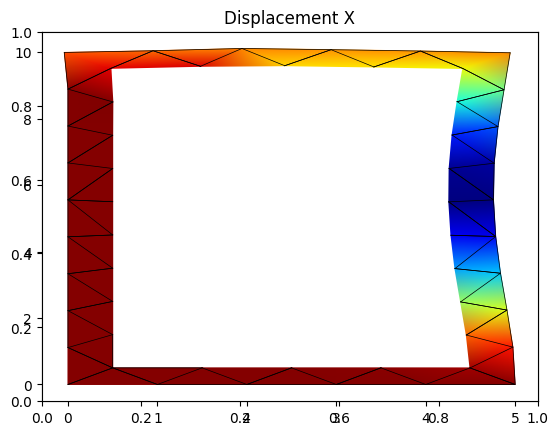
# Post-processing and plotting
(stress_xx, stress_xy, stress_yx, stress_yy, strain_xx, strain_xy,
 strain_yx, strain_yy, disp_x, disp_y, X, Y) = post_process(NL, EL, ENL)

disp_xNormalized = (disp_x - disp_x.min()) / (disp_x.max() - disp_x.min())

import matplotlib.colors as mcolors
def truncate_colormap(cmap, minval=0.0, maxval=1.0, n=-1):
    if n == -1:
        n = cmap.N
    new_cmap = mcolors.LinearSegmentedColormap.from_list(
        'trunc({name},{a:.2f},{b:.2f})'.format(name=cmap.name, a=minval, b=maxval),
        cmap(np.linspace(minval,maxval,n)))
    return new_cmap
fig_1 =  plt.figure(1)
plt.title('Displacement X')
axdisp_x = fig_1.add_subplot(111)

for i in range(np.size(EL,0)):
    x = X[:,i]
    y = Y[:,i]
    c = disp_xNormalized[:,i]
    # gouraud smoothes the results
    cmap = truncate_colormap(plt.get_cmap('jet'),c.min(),c.max())
    t = axdisp_x.tripcolor( x,y,c,cmap=cmap, shading='gouraud')
    p = axdisp_x.plot(x,y,'k-',lw=0.5)
Exercise#
Modify the geometry of the problem and boundary conditions to solve the following cantiliver beam with hollow cross section.
